

This Schlage lock allows for up to thirty codes. That’s plenty of flexibility in how a family takes advantage. Let’s look at how to, and some of the rules.
Setting up individual user codes is easy
It all starts with the default Programming Code and two default User codes. You’ll find the all important Programming code on the inside of the main part of the interior side of the lock. And it’s also in the documentation. Don’t lose it, I suggest you write it down somewhere too, especially if you tend to misplace manuals.
Once you’ve assembled this Schlage lock, you will have to uninstall the inside part, to locate that code again!
I didn’t bother with the default user codes except to try one once, as a test, before programming in the codes I wanted.
The Programming Code is a six digit number. It is required to do virtually all of the Schlage Camelot 619’s setup of user codes, and many other features.
User codes can be anywhere from four to eight numbers long – but, this is important – they must all be the same length. Let’s say you have five 4 digit user codes set up. If you create a new user code with 5 digits, it will cause the deletion of the other five user codes.
Note: This lock does have a key, but Schlage considers that almost an emergency feature. This lock is designed to be controlled from the outside by either the touch panel, or by App, via a Z-wave hub.
[sam_pro id=”1_18″ codes=”true”]
Also noteworthy: When setting up the Schlage lock, the keypad, of course, is used to unlock the Schlage from the outside. But when it comes to locking the door from the outside, you have two choices, you’ll have to pick one when you set up the lock:
The default choice is that you merely have to press the Schlage button at the top of the keypad, to lock it. But, if you prefer, you can set that so that one must put in a User Code to lock the door. Personally, I favor, and recommend just using the button.
For our examples, let’s stick with a four digit user code.
Creating a new User Code
- Press the outside Schlage button (same one), and enter the Programming Code (six digits).
- Press 1
- Enter your 4 to 8 digit User code desired
- Enter the same 4 to 8 digit User code again
- Lock will beep twice and flash twice to confirm
the green check mark will light on the panel, or if unsuccessful, a red X.
Adding additional Codes
- After step 5 above, simply put in another code of the same length
- Enter that new code a second time
- Again, the lock will beep twice, flash twice…
Deleting a Code
The process is basically the same, but after putting in the programming code, enter 2 instead of 1 to delete, then put in the code you want deleted, two time. It’s that easy.
I could run through a number of other setups, but this two part chart pretty much shows you how to do most functions.
[sam_pro id=”1_18″ codes=”true”]
That includes engaging Auto Lock, which has the Schlage Camelot 619 automatically re-locking itself 30 seconds after the door is unlocked. That’s great for those who like to keep their door locked all the time.

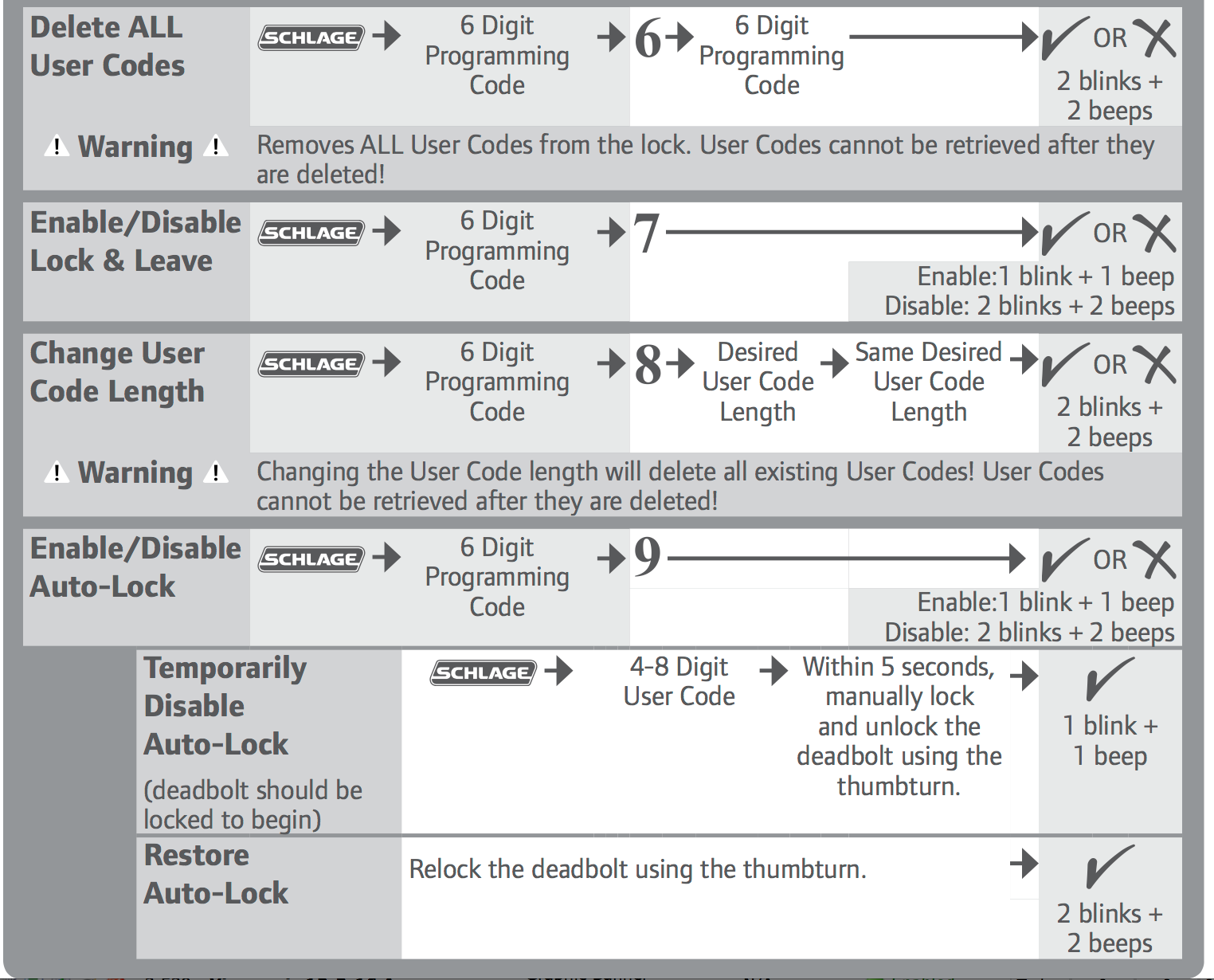
Please note: If you are using an App – say a Z-wave hub’s, that allows you to set up the codes (something that my SmartThings hub App can’t do without an enhancement), be aware that setting up codes using the App will normally delete codes put in using the keypad. Schlage apparently wants only one way to do things, at a time, in the same fashion that if you are using codes of one length (say 4 digit), but then put in a 6 digit code, it will delete any 4 digit codes.
The thing is, just because the SmartThings App doesn’t let you set codes, doesn’t mean you can’t. SmartThings has a huge community of users, many hard core DIY types among them. They come up with all sorts of enhancements one can take advantage of. One such enhancement allows you to program user codes. Here’s a link to the page in the SmartThings community, that talks about one solution for programming the codes:
https://community.smartthings.com/t/release-door-lock-user-code-management-create-delete-and-schedule-codes-with-automatic-lock-unlock-and-shm-integration/7043
Of course I would consider having a company’s App itself have the features, SmartThings strategy relies on their community to make it one of the most capable hubs out there. Although I didn’t work with this community enhancement, Dave, using the Wink App, with his identical lock, has used that app to set all his codes. I’ve includes a series of screen shots of his Wink App showing you the process. No doubt the SmartThings lock will work similarly with the community enhancement.
Art's been reviewing high tech products and editing their reviews for 15 years. He launched his first website presenting solutions.com (sold in 2003) in early 1995 when there were only a few thousand .coms. He launched ProjectorReviews.com in 2000, and started planning Smarterhomeautomation.com back in 2011.
Art's goal is to provide in-depth reviews on the latest and hottest products that fit into the Smart Home, aka Home Automation, as well as insightful articles to educate people into what's available, what makes the most sense, and where the market is going, so people can better plan, and implement their goals for energy efficient, convenient, and downright "cool" capabilities.
Ancient history: Born in Allentown PA, Graduated 1972. Sold and managed stereo stores (and did a little surfing) in the early, mid-70's before getting into computers and more AV. Managed the first computers store in Pa, starting in 1979 (not the first manager). Moved to selling computers to major accounts. Then moved west to SF area, for a four year stint with Epson starting in 1982, then left for one of the early large venture backed start-ups in the Silicon Valley - Presentation Technologies. Left there to start up Presenting Solutions, which became the first projector focused reseller on the internet (Jan 1995). Married Lori in 1990, and have been enjoying our daughter Lisa, since 1992! Presently living, and working in San Clemente, CA.