



A few notes before we get into how well the 1More EVO earbuds with ANC (Automatic Noise Cancelling) perform – but first what’s in this EVO review.

Topics – in order:
An Overview of the EVO Earbuds – Background to the review
EVO Hardware: Comfort, Documentation and Use, Battery Life, Case, and Warranty, What is Included
Sound Quality of EVO True Wireless Noise Cancelling Headphones
The Bottom Line and Price/Performance
Comfort, Documentation and Use, Battery, Case, and Warranty
Excellent sound quality is my number one concern with any buds or headphones, but obviously with earbuds, comfort is essential. The overall look of the EVO is a bit larger than some other buds, but it doesn’t have a component sticking down, outside of the ear (think original Apple Airpods).
They are pretty – Slightly tear drop shaped, the wider area goes toward the top of your ear, the narrower to the bottom. When in their case, as you would expect, the left bud is on the left side… They are available in black, or white. They are a bit thicker than most.
The case, of course, is a recharger. The 1More App will tell you how much charge each earbud has and how much charge is left in the charging/storage case. The case indicates how well it’s charged, with its LED either doing green, amber or red.
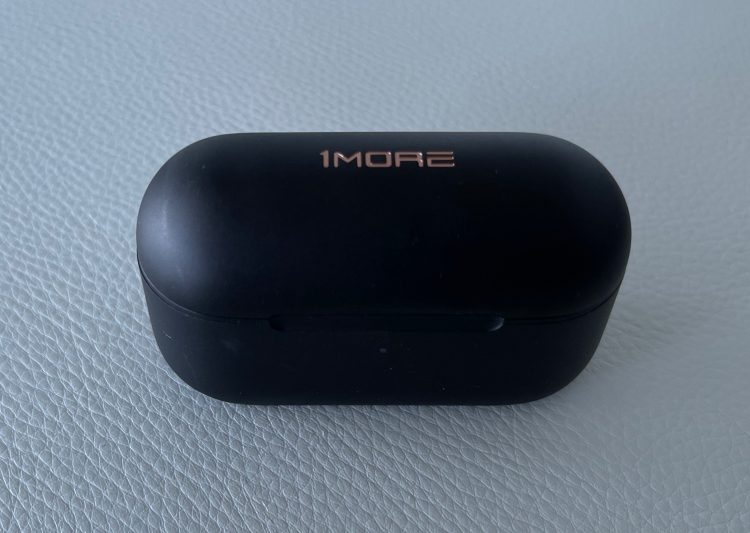
Naturally rechargeable earbuds like these are larger and heavier than the tips of my collared, or my wireless, since neither of those has to have batteries in the earbuds themselves.
EVO Comfort:
So, yes, they are bigger and heavier, that said, they are almost identical in that regard, to Apple’s AirPod Pros. (1More buds are 5.7 gm vs 5.4 for Apples. Brands of buds, in their recharging cases weigh within 2 grams of each other aka, essentially identical weight wise. Still the point is, there are lighter buds out there. In fact, Apple’s AirPod Pro buds are more than 20% heavier than the original AirPods.
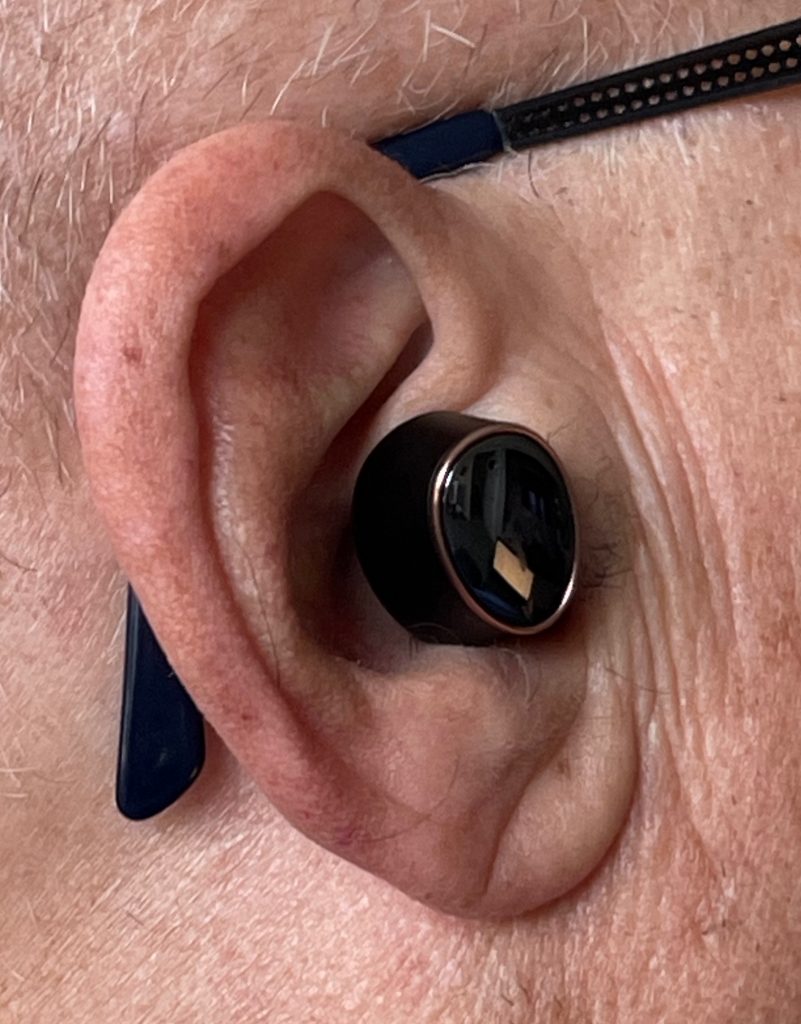
Looking almost jewelry like, the EVO buds are available in black or white. My pair, as shown, – is obviously black. Here’s how one looks inserted into my ear: (I’m not going to win any beauty contests – with or without earbuds.)
These 1More EVOs come with a package of 5 different sized tips for the earbuds – from XS to XL as they label them. Also in the rather fancy and informational packaging, you will find a very small (3×3 inch), but detailed multi-language manual, that will challenge your eyesight, or at least mine. Good news, the documentation is also on the website, and a “short course” on the app!
Official Performance and Specs of the 1More EVO True Wireless ANC earbuds:
Physical: Buds: 5.7 gm each. Case Wt: 47gm
Together that adds up to just shy of 60 gms, so that the total weight works out to just about 2 ounces
Each earbud has a 48mAh battery capacity. The case stores 450mAh
Case charging time: 2 hours
Battery Life, aka EVO Playtime: 5.5 hours or 8 hours depending on ANC – based on 50% volume (which is reasonably loud)
Total Playtime including recharging from the base: 20 hours (ANC) and 28 hours respectively
Software: Bluetooth version: 5.2
Warranty: 1 year parts and labor
Earbuds That Fit Well, but Large: These are not “tiny” earbuds. I was hoping they might be flush enough to my ear to fall asleep in bed with them in. No luck. Rolling over sometimes knocks one or the other out. Well, no surprise there.
Overall, I find them very comfortable. I’ve had them in for 3-5 hours at a time, to date, probably easily a dozen times, as I’m using them for music, but also books on Audible, where my sessions tend to be multi hour. I have yet to take them out due to any discomfort. At no point have my ears have started to hurt. For my own ears, at least, I’ll give them an A for comfort. We’ve all got different shaped ears, of course.
EVO Control Features:
If there’s one thing I’m not thrilled with is, the basic range of controls that are possible from these earbuds, without using the App. That’s not to say that the competition is any better
Here’s the story. They turn on as you remove them from the case – no surprise there, although there’s an App option as to whether they pause or keep playing when removed from ear.
Once in my (or your) ear, here are the options: The EVOs recognize three signals
Double-tap, Triple-tap, and touching an earbud for 1.5 seconds. Double and triple taps can be reprogrammed in the App. Touching the surface for 1.5 seconds works a toggle between ANC On, Off, and Transparent. The default for tapping twice is Pause/Play, Default for a Triple-tap is voice control, which means on my iPhone, I can use Siri. See Changing The Tap Defaults section below for options for modifying what the tapping does.
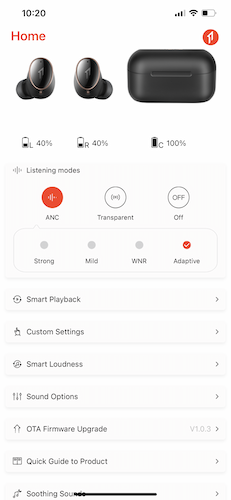
Pause/Play: Tap twice
ANC: Hold your finger on the large surface of either earbud for 1.5 seconds.
ANC On:
Noise reduction working 4 modes
Strong – max ANC
Mid – less ANC
Wind – Better for outdoors/wind
Adaptive – Variable ANC (my preferred)
ANC Transparent:
Lets outside sounds through
There is a pass through mode, and a voice enhanced mode
ANC Off: Off, only the seal between buds and ear, blocks outside sound
Shaping the Sound Quality:
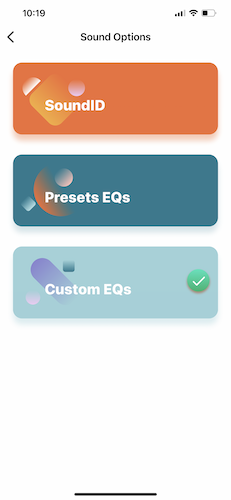
Sound ID: Create a custom equalization of sound based on music samples. You can save one setting. (I favor using the Equalizer options)
Equalizers: There are 12 preset equalizers, or you can create your own
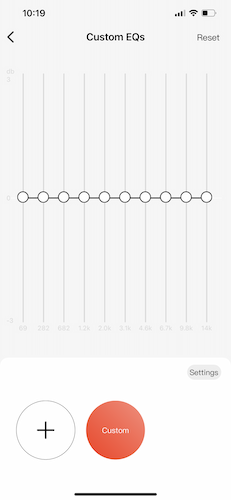
For the Custom there’s the usual 10 frequency adjustments
Soothing Sounds: Weird – sounds like a fireplace crackling, waterfall, but not good
Changing the Tap Defaults:
Unfortunately the Double Tap feature has to be the same on both buds if you choose Play/Pause or Voice (Siri with an iPhone). I wanted to set the left bud for play/pause and the right double tap for voice, but it won’t let me.
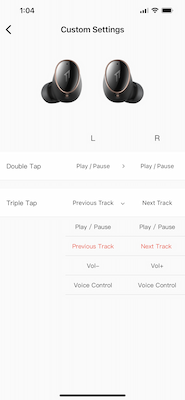
If you set double tap (or triple) to Volume, then the left is down, the right is up volume. If you want to control tracks instead, (double or triple tap) then the left ear will do Previous Track and Right will perform Next Track.
I hope they will take my advice in a future App update, to allow setup so that Play/Pause can be assigned to only one ear, and Voice to the other. That way I can have both of those, plus Previous and Next track on the triple tap.
Still, they probably should also have a quad tap (or alternative) for two more controls, so volume up and down can be added, rather than substituted for, say, Next and Previous Track functions.
That folks is my biggest complaint about these EVOs. Which is to say, I’m still liking them a great deal!
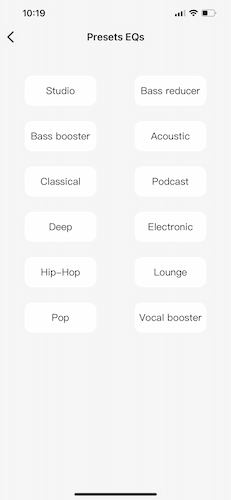
Or you can customize your own equalization and save.
The controls work as you would expect them to. That said, with all the preset options, only those who really like to play with their toys, are likely to use the custom.
That pretty much covers the functionality of the EVO hardware and its app, other than discussing the equalizer functions which I’ll deal with in the next section: Sound Quality.