


• About
  • Contact Us
Smarter Home Automation
  • Home
  • Reviews
    • All
    • Outdoor Smart Home
    • Smart Doorbells
    • Smart Speakers
    Lockly Vision Elite Review: Impressive Integrated Smart Door Lock and Video Doorbell

    Lockly Vision Elite Review: Impressive Integrated Smart Door Lock and Video Doorbell

    Owl Wired Smart Smoke Detector Protects Your Home from More Than Just Smoke

    Owl Wired Smart Smoke Detector Protects Your Home from More Than Just Smoke

    Level Lock+ Connect⎯One of the Smallest Smart Locks Available

    Level Lock+ Connect⎯One of the Smallest Smart Locks Available

    Eve Energy Monitoring Integration into SmartThings Benefits Android Users

    Eve Energy Monitoring Integration into SmartThings Benefits Android Users

    6 Smart Plugs That Add Convenience to Your Life

    CEDIA 2023 Spotlights Bang & Olufsen: High-Fidelity Home Speakers for Audiophiles

    CEDIA 2023 Spotlights Bang & Olufsen: High-Fidelity Home Speakers for Audiophiles

    Trending Tags

    • Smart Home
    • smart gadgets
    • Smart Lighting
    • Home Security
  • News
  • Contact Us
No Result
View All Result
  • Home
  • Reviews
    • All
    • Outdoor Smart Home
    • Smart Doorbells
    • Smart Speakers
    Lockly Vision Elite Review: Impressive Integrated Smart Door Lock and Video Doorbell

    Lockly Vision Elite Review: Impressive Integrated Smart Door Lock and Video Doorbell

    Owl Wired Smart Smoke Detector Protects Your Home from More Than Just Smoke

    Owl Wired Smart Smoke Detector Protects Your Home from More Than Just Smoke

    Level Lock+ Connect⎯One of the Smallest Smart Locks Available

    Level Lock+ Connect⎯One of the Smallest Smart Locks Available

    Eve Energy Monitoring Integration into SmartThings Benefits Android Users

    Eve Energy Monitoring Integration into SmartThings Benefits Android Users

    6 Smart Plugs That Add Convenience to Your Life

    CEDIA 2023 Spotlights Bang & Olufsen: High-Fidelity Home Speakers for Audiophiles

    CEDIA 2023 Spotlights Bang & Olufsen: High-Fidelity Home Speakers for Audiophiles

    Trending Tags

    • Smart Home
    • smart gadgets
    • Smart Lighting
    • Home Security
  • News
  • Contact Us
No Result
View All Result
Smarter Home Automation
Home Manufacturers Google

Google Home – the voice of your smart home

by Dave Duncan
April 22, 2017
Google Home is compatible with a log of devices

Google Home is a well educated personal assistant. The voice controlled speaker not only brings good sounding music and the knowledge of the internet into your home. Google Home can also control your smart devices. Compatibility for Google Home as been growing daily.  Voice control is a great feature to add to your home automation.  As long as it is responsive and reliable.

[sam_pro id=”1_15″ codes=”true”]We will see a few new faces in the category this year.  We already have Siri, Alexa and Google Home.  Soon we will see offerings from Microsoft and other lesser known 3rd parties that want to bring their personal assistants to market.

RelatedPosts

New Google Home App Has Support for Garage Door Controls

Is The Smart Home Here? And How Much Smarts Does it Take?

The New Amazon Echo – A Complete Overhaul of Amazon’s Smart Speaker

Google Home is a great personal assistant. Its conversational responses are a pleasure.  Backed with the knowledge of Google and Wikipedia it really rivaled my long time friend with the blue ring right out of the box.

I was a little worried when I first started using Google Home. As I stated briefly, there was limited support form smart home products when the speaker was first released.  That has quickly changed. As of now, Google Home is compatible with a long list of devices and growing.  Google Home is compatible with the leading smart Hubs, Wink 2 and Samsung Smartthings.  Compatibility with smart hubs is key. A home automation hub like the Wink 2 is what really brings everything together.

Adding the Google Home into my home scheme was very easy.  As with the
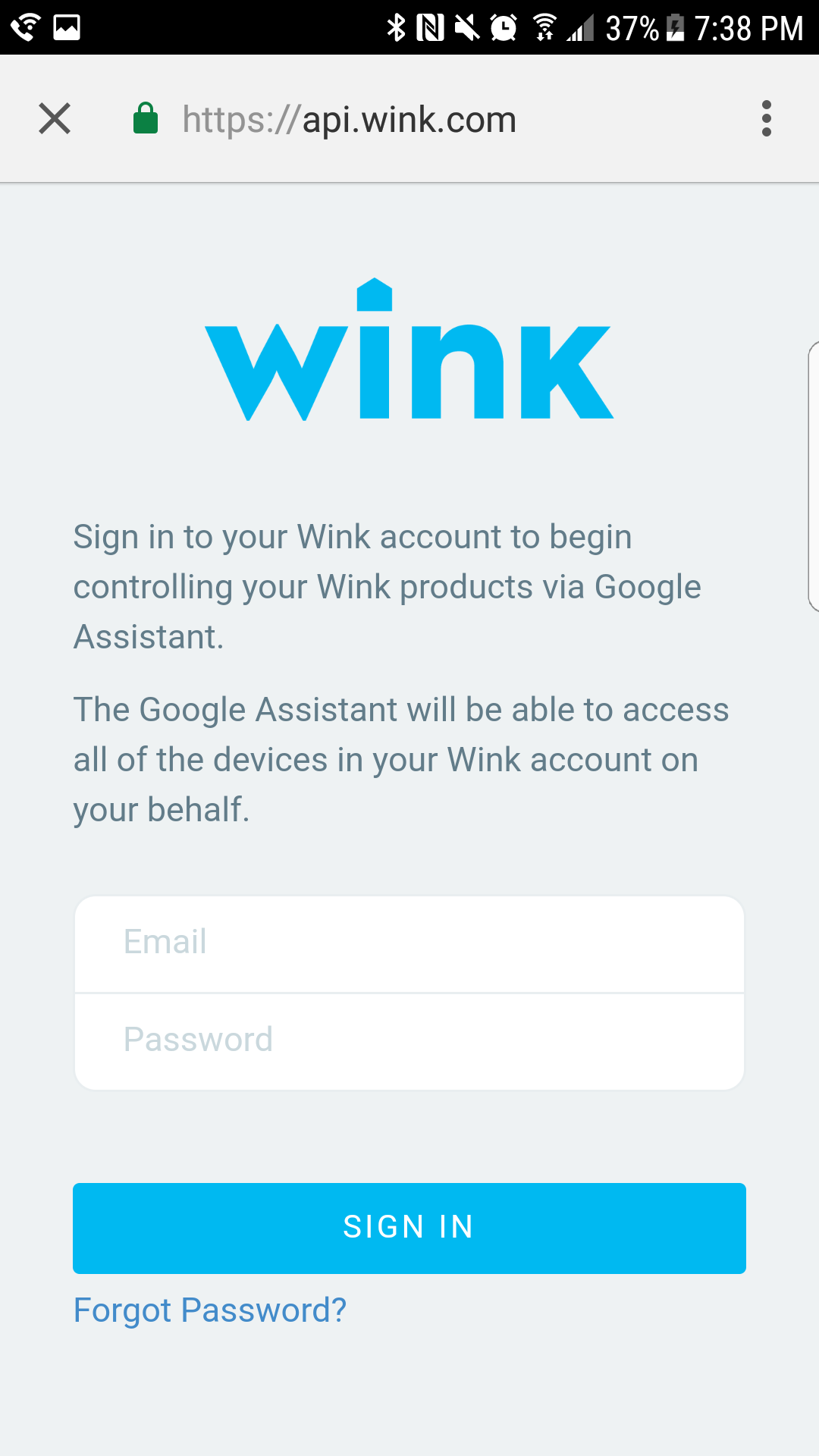
Easily sign in to enable Wink and Google Home to work together.

growing number of smart home devices, it is as easy as connecting the accounts.  I was easily able to navigate into the Google Home app, open the menu and select home control, click the + sign and select Wink.

Once I selected to connect my Google Home to my Wink 2 hub, I was prompted

with a login page.  I input my username and password for my Wink account and within seconds they were connected.  Once I added my Wink 2 hub, all of the lights and switches that are connected to my hub became available to use with Google Home.  The names were also imported.

I was able to control all of my lights and switches right away. Using the same names that I use in my Wink app and with other personal assistants.   One thing I do like about Google Home is that its responses are more conversational.

Every command gets a brief response.  When I say,”Hey Google, turn on the table lights.”  I will get the response,” Sure, turning the table lights on.”  Google Home will also tell me if something is not responding.  When I ask Google Home, ” Turn on the Master Bedroom.” Google will respond with, “turning on 2 devices, the closet light is not available. ”  There are three devices in the master bedroom that should turn on.  In this case, the light switch for the closet smart bulb was off. As the bulb is smart and not the switch, it really wasn’t available.

I do like that Google Home will tell you that you have a device in a group that is not responding or available.  Other assistants will simply respond with an OK, and nothing will happen with the item that is unavailable. They don’t respond unless you ask to control that specific device. Another advantage to the responses the speaker delivers is the information it provides.

[sam_pro id=”1_14″ codes=”true”]When I ask to change the table lights to 30%, the speaker will respond with,” Ok, setting the brightness of the table lights to 30%”.   Should I mumble or mispeak, google home will repeat it and tell me that it doesn’t know how to do that yet. Which can be somewhat comical.

Google Home works very well at providing voice control for your devices. There are only 2 mic holes that I noticed on top. The speaker still responds and hears my commands well enough. The reaction time to saying the command and having the light turn off and on was pretty quick for the most part. There was a time or two every so often where instead of a 1-2 second delay, it was a bit longer.

If you would like to see the screen shots of connecting the Google Home to the Wink 2 and the Nest thermostat, please take a look at the picture viewer below.  The process was very similar.

One of the cool things that I noted while connecting devices was that Google app would end each connection session with a success page that contained specific commands for the devices that were just added. When I connected the Wink 2 smart hub, I received commands about controlling lights and changing the brightness.

As I added the Nest thermostat, I received commands about controlling the temperature. It was good to see some thought put in to the process and it was just a cookie cutter ending.



Dave Duncan
+ postsBio
  • Dave Duncan
    https://www.smarterhomeautomation.com/author/davecduncan/
    EZVIZ Ez360Pano -360° of security – The Review
  • Dave Duncan
    https://www.smarterhomeautomation.com/author/davecduncan/
    EZGuard 1080 – Home security system review
  • Dave Duncan
    https://www.smarterhomeautomation.com/author/davecduncan/
    August Video Doorbell Cam Pro – Keeping your porch safe – The Review
  • Dave Duncan
    https://www.smarterhomeautomation.com/author/davecduncan/
    August Doorbell Cam Pro- Install, Mounting and the app – Review
Tags: google assitantgoogle homehome automationHome Automation ReviewSamsung SmartThingsVoice ControlWink
Share194Tweet121
Next Post
Google Home – Bringing Voice control to your AV

Google Home - Bringing Voice control to your AV

POPULAR POST

  • CEDIA: Smart Home Personal Assistants – Amazon Alexa’s New Friends, Apple HomeKit Siri

    Lutron Caseta Wireless Lighting Review: Pros/Cons, Summary, Award

    1586 shares
    Share 634 Tweet 397
  • Nest 3rd Gen Learning Thermostat Review – Install, Setup, Apps and Web

    1309 shares
    Share 524 Tweet 327
  • August Smart Lock Mortise Kit – Property Developers and Owners Rejoice

    1059 shares
    Share 424 Tweet 265
  • Gaming Screens: Samsung Odyssey Ark 4K UHD vs LG OLED Flex (LX3)

    946 shares
    Share 378 Tweet 237
  • Smart Home, Smart Yard: 10 Outdoor Smart Products to Transform Your Exterior Living Space

    759 shares
    Share 304 Tweet 190

Follow Us

Subscribe To Our Newsletter!

Categories

[prod_category_list]

Articles

[recent_custom_posts_footer type="articles"]

Reviews

[recent_custom_posts_footer type="reviews"]

Recent News

Shopping for your Next, Bigger, Smart TV – What to Know- Part 1

Shopping for your Next, Bigger, Smart TV- Part 3

October 1, 2025
Shopping for your Next, Bigger, Smart TV – What to Know- Part 1

Shopping for your Next, Bigger, Smart TV – What to Know- Part 2

September 24, 2025

© 2022 SmarterHomeAutomation.com a website by The Metaverse Resource, LLC

Welcome Back!

Login to your account below

Forgotten Password?

Retrieve your password

Please enter your username or email address to reset your password.

Log In

Add New Playlist

No Result
View All Result
  • Home
  • Reviews
  • News
  • Contact Us

© 2022 SmarterHomeAutomation.com a website by The Metaverse Resource, LLC

This website uses cookies. By continuing to use this website you are giving consent to cookies being used. Visit our Privacy and Cookie Policy.