


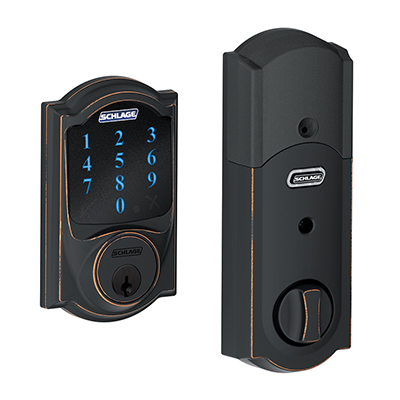
Schlage’s Camelot 619 (BE469NX version) proved very reliable on our front door, with only the one issue relating to the battery notification to report. Note that it did not offer some capabilities found on other locks. due to using the SmartThings Hub rather than a different hub. And of course there’s Apple HomeKit / Siri for those using the “newer” versions of the lock that do support Apple, called Schlage Sense locks – which come in Camelot and other styles.
How to tell the two versions apart? The product code for the Schlage Camelot 619 reviewed here, is BE469NX.The other version is a BE479NX sells for slightly more, and works with their Sense App. The BE479NX version uses Bluetooth to communicate with the Schlage Sense App. Apple Siri (HomeKit) is supported as well. Although we worked with the BE469NX version we prefer the expanded capabilities of the BE479NX.
Once I had this lock set up, there really weren’t any operational surprises.
What I’m talking about, though, is if using a 3rd party app – i.e. a Z-Wave hub’s App, you likely will be missing some features that would be included if working with a lock manufacturer’s own direct app (if a lock has one), when it comes to setting up the lock and controlling it. In that sense, (pun intended), using the newer BE479NX version assures you of maximum control. I should note that Dave’s Schlage allows control from his Wink, including setting codes, so pending confirmation (and content) he’s sending me on his setup, I’m assuming his is the “479” version. Consider:

With some locks – like the Kwikset Kevo we reviewed, I could create codes that only worked at certain times of the day, certain days of the week. Now that’s a pretty cool feature. We have a cleaning service come in a couple times a month. I set up their code on the Kevo so that it would only acknowledge their code (unlock the door), on Thursdays between 11am and 3pm when they are scheduled to come here. On occasion when they need to change the schedule, I could quickly (a minute or so) modify the settings for them for the new times or just issue a “throw away” code, for a single occasion.
Now this kind of capability may exist with Apple HomeKit, or the Wink’s App, but at this time, I don’t see a way to do it with my SmartThings Hub app, or directly from programming the lock with the keypad. That’s why its important to figure out what features you want in a Smart Lock, and make sure you will get them from the lock, when using the rest of your gear. If you favor having that ability regarding temp or tailored codes for certain days/times, there are other locks, including the Kevo we’ve reviewed in the past, that can do that.
[sam_pro id=”1_18″ codes=”true”]
Both installation and setting/changing codes went smoothly. If you are using this Schlage lock with a Z-Wave controller, then it’s up to you to check into what features are supported. They should all allow manual locking and unlocking. Most will let you lock or unlock at preset times. Most should also let you tie it in to other functions (such as an App’s Away, Vacation, and other modes, and depending on the App, not the lock, that could include Geo-tagging, so that, for example:
If you are approaching your home in your car, with geo-tagging features operating in your home setup, your home automation system – i.e. Z-Wave hub, can recognize that you have come “home,” for example, that thanks to geo-tagging it learns that your phone just got within say 500 feet of your front door, so you can have that trigger unlocking the door. You could also conceivably tie the lock’s locking and unlocking to motion sensors. That is, if no motion detected in your house for 15 minutes automatically lock the door. Again, this comes down to what features the Apps support.
All considered, this is a solid solution from one of the oldest and largest lock manufacturers (Schlage was founded almost 100 years ago.) Given that what you use it with, may determine how many features, and which ones are accessible from those apps,
Schlage Camelot 619 – Physical Key
Obvious from looking at the lock there is a place to unlock it with a provided key. Note that Schlage provides that key as a back-up, they do not seem to consider carrying a key around as an alternative, as something to use regularly. (Kwikset which allows for their “easy” re-keying of their locks, does treat the key as a regular 3rd way to work the lock in addition to code and app.) In the Installation manual Schlage says as much, so maybe this is the key you bury somewhere in your yard for emergencies.
Regarding Voice Control and Smart Locks in General: Be Careful
About the only thing you really do not want, is to ultimately have the lock working with personal assistants (likely through a hub), where it allows the door to be unlocked by voice command. That would be scary. That is, you might have a smart lock locked, while you are away. Then a “bad guy” walks up to your front door and yells: “Alexa, unlock the front door,” or maybe you are using Apple Siri or Hey Google – for Google Home. Note: As of this review being published, Google Home has been shipping for barely one month. It will be a while before it supports a lot of smart home gear.
But it would be nice if your personal assistant can lock the door. Oh, no doubt you could stay safe even if the App being used allowed voice unlocking, if you are careful with the naming, and are not careless in terms of sharing the name. For example, if I named this Schlage lock: “Schlage Bronze 833” then the “bad guy” would need to know the full name, and Say something like: Hey Google, unlock Schlage Bronze 833. Just make sure no bad guys are listening in when you lock or unlock the door by voice.
One unresolved issue noted:
With at least two other smart locks I worked with, those locks alerted me repeatedly when the battery power was low.
[sam_pro id=”1_18″ codes=”true”]
I was surprised, therefore when one day, I tried to unlock the the door from the outside with the keypad and the keypad was dead. I was caught off-guard. No key, no ability to access keypad or control by the App. Fortunately, I was able to enter my house by opening the garage door. (Clicker, App – whatever works!)
Sure enough, I looked at the Samsung SmartThings App, and it had advised that the battery needed replacing (you can see that in one of the menu images on the previous page), but I hadn’t noticed. After this happened, that reminded me to set up some notifications, going forward, to warn me. Whether the Schlage can notify by App when battery is low, rather than dead, is another item that may vary depending on the App being used, so keep that in mind.
That said, I was surprised when this happened. I didn’t think the battery would be low yet. I suspect that someone here didn’t close the front door all the way (it does stick, we have a new door on order) so that the deadbolt couldn’t extend. Problem is, if the lock alerts via a sound, no one was around to hear it. It may well have been trying repeatedly to lock, and wore out the batteries. I will update this after the holidays, after speaking with the Schlage folks. I had looked back in the logs several days, but did not see any warning about battery low until the battery dead message, but there might have been one just beyond the “recent” list of activities.
I will include the BE479NX version of the Schlage Camelot lock as far as receiving our Too Cool award. What’s a Too Cool award worth? As I say in the caption below the graphic, that makes this equivalent to a 4 star or slightly better rating. In other words: Good product. I’ve cited a few of the reasons why this particular version didn’t rate higher – ie. no Apple HomeKit support, and also no Schlage App. Had I reviewed the 479 version the review might have resulted in our next higher up award.
Bottom Line: A solid “classic” smart lock. Many finishes available. Physically large (unfortunately) on the inside (as are almost all such locks), in part because of requiring batteries (most use 4 pen lights, and that takes up some space.). From a family standpoint, my wife likes this lock. She prefers this keypad over the Kwikset’s that we previously reviewed. And the Schlage keypad works with gloves on, a real plus for folks that live where there’s winter! I especially like that there’s a physical button to lock it, or to start the unlock process.
Because I feel it’s better to be able to depend on the maker of a device, rather than the maker of a hub, for supporting features, I do believe that the Sense version – the BE479NX, is worth the extra $20+ dollars. With it, you can use the Schlage Sense App (iOS or Android), to handle user codes.
That said, most of us will create a number of codes one time, and that will be it. So, it’s your call whether to spend the extra.
Art's been reviewing high tech products and editing their reviews for 15 years. He launched his first website presenting solutions.com (sold in 2003) in early 1995 when there were only a few thousand .coms. He launched ProjectorReviews.com in 2000, and started planning Smarterhomeautomation.com back in 2011.
Art's goal is to provide in-depth reviews on the latest and hottest products that fit into the Smart Home, aka Home Automation, as well as insightful articles to educate people into what's available, what makes the most sense, and where the market is going, so people can better plan, and implement their goals for energy efficient, convenient, and downright "cool" capabilities.
Ancient history: Born in Allentown PA, Graduated 1972. Sold and managed stereo stores (and did a little surfing) in the early, mid-70's before getting into computers and more AV. Managed the first computers store in Pa, starting in 1979 (not the first manager). Moved to selling computers to major accounts. Then moved west to SF area, for a four year stint with Epson starting in 1982, then left for one of the early large venture backed start-ups in the Silicon Valley - Presentation Technologies. Left there to start up Presenting Solutions, which became the first projector focused reseller on the internet (Jan 1995). Married Lori in 1990, and have been enjoying our daughter Lisa, since 1992! Presently living, and working in San Clemente, CA.